 Formula Explainer
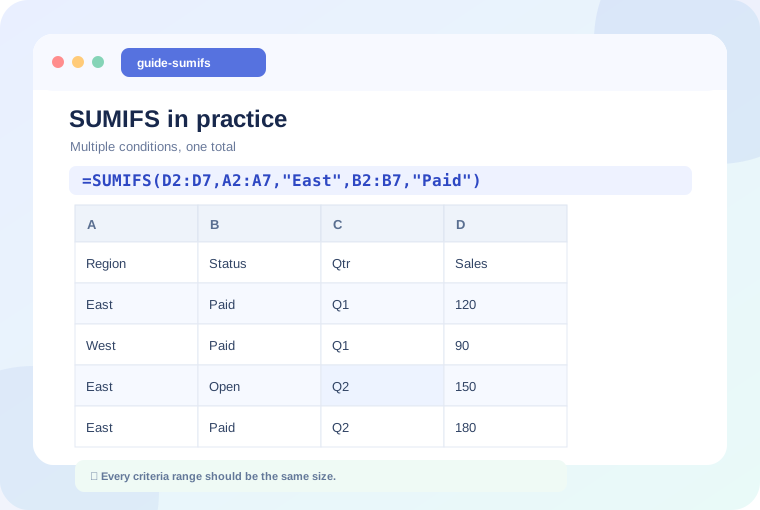
In this guide: We'll explain the concept with realistic examples and offer specific checks you can apply to your own spreadsheet.
What SUMIFS is designed to do
SUMIFS adds values only where every supplied condition is satisfied. It is ideal for questions like “How much did the East region sell on paid orders?” or “What is the total for this product during one month?” Unlike SUMIF, SUMIFS begins with the range of numbers to be added.
=SUMIFS(D2:D100,A2:A100,"East",B2:B100,"Paid")This adds values from D when column A is East and column B is Paid. Rows must line up across all three ranges.
Understand the argument order
- sum_range: The numeric cells you want to total.
- criteria_range1: The first column to check.
- criteria1: The first test, such as
"East". - criteria_range2 and criteria2: A second test, with optional additional pairs.
Use criteria stored in cells
Instead of hard-coding a region name, refer to a selection cell. For example, =SUMIFS(D2:D100,A2:A100,G2,B2:B100,"Paid") will update when G2 changes. To use comparison operators alongside cell values, combine them using an ampersand.
=SUMIFS(D2:D100,C2:C100,">="&H2,C2:C100,"<="&I2)Dates need a deliberate boundary
When your date cells include times, a less-than comparison with the next day may be safer than comparing to the last day at midnight. For example, use "<"&(I2+1) where I2 stores the final calendar date of the reporting period.
Common mistakes
All criteria ranges should have the same size as the sum range. Check that amounts are numeric and that labels do not contain unwanted spaces. If the total is zero, start with COUNTIFS using the same criteria to see whether the selection matches any records.
Practice question
Make a simple table with Region, Payment status, Month, and Amount. Calculate totals for one region and one status, then add a third condition to isolate a month. Compare the result with a filtered view of the original records.
Keep learning
Continue with a related guide or experiment using our interactive formula explainer.
Why Excel Formulas Return 0 (and How to Fix It) →
Practice with a formula