 Formula Explainer
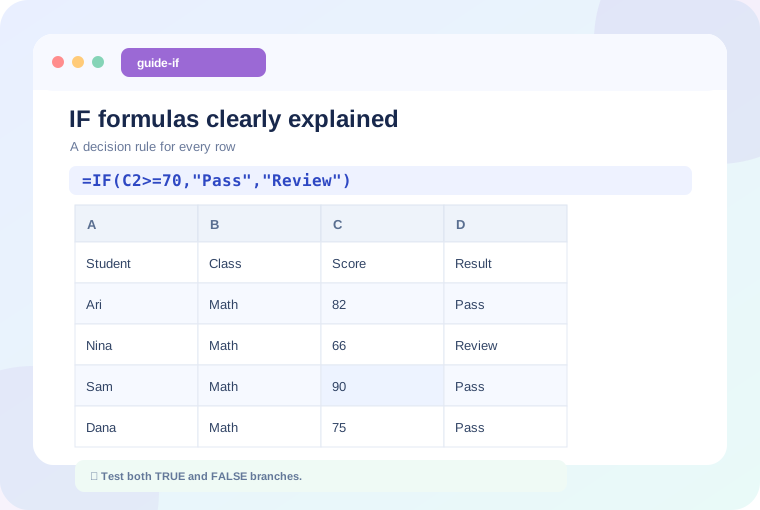
In this guide: We'll explain the concept with realistic examples and offer specific checks you can apply to your own spreadsheet.
What an IF formula means
IF makes a decision based on a logical test. It returns one result when the test is TRUE and a different result when it is FALSE. You can use it for grades, eligibility, follow-up flags, and quality checks.
=IF(C2>=70,"Pass","Review")If C2 contains 82, the formula returns Pass. If it contains 66, the result is Review. Numbers are not placed inside quotes, while fixed pieces of text such as "Pass" are.
Read IF as a sentence
Read the formula aloud: “If C2 is at least 70, write Pass; otherwise write Review.” This simple habit helps confirm the branches before you copy a formula through an entire column.
Combine conditions with AND
Suppose a learner must score at least 70 and have attendance above 80%:
=IF(AND(C2>=70,D2>=80%),"Eligible","Review")AND is TRUE only when both requirements are met. Replace AND with OR if either condition is sufficient. Test the logical part separately before returning labels.
What about nested IF formulas?
Nested IF can group several bands, but a long chain can be hard to maintain. For simple classifications, IFS or a lookup table may be easier to audit. Always consider boundary values: for a threshold of 70, test 69, 70, and 71.
Handle blanks deliberately
A blank score may be different from a score of zero. You might choose =IF(C2="","Not entered",IF(C2>=70,"Pass","Review")) if missing input must be flagged. Decide what missing data means in your workflow before hiding it.
Final check
Copy the formula to several rows with contrasting outcomes, and verify that relative cell references move as expected. A good IF formula is one that another person can read without guessing your assumptions.
Keep learning
Continue with a related guide or experiment using our interactive formula explainer.
Why Excel Formulas Return 0 (and How to Fix It) →
Practice with a formula